
FactoryOS: live machine monitoring for CNC and VMC shops
See which machines are cutting, which are standing, and what the standing time costs in rupees, from any phone browser.
What FactoryOS is.
FactoryOS is machine monitoring software for CNC job shops, VMC workshops, turning shops and MSME machine shops. A small gateway at each machine reads the Fanuc control over Ethernet and shows the machine live in a web app.
It gives you an OEE-style view of each machine: run, idle and alarm time, utilization and availability. It does not claim an exact OEE figure. It shows where each machine’s hours went, and prices the time it was not cutting at that machine’s own hourly rate, so the cost of an idle machine is a rupee figure you can act on.
- Built for
- CNC job shops, VMC workshops, turning shops and MSME machine shops
- Works with
- Fanuc controls with Ethernet, read over FOCAS
- At the machine
- Read-only. It never writes to the CNC.
- Where you see it
- A web app that works in phone browsers
What FactoryOS does.
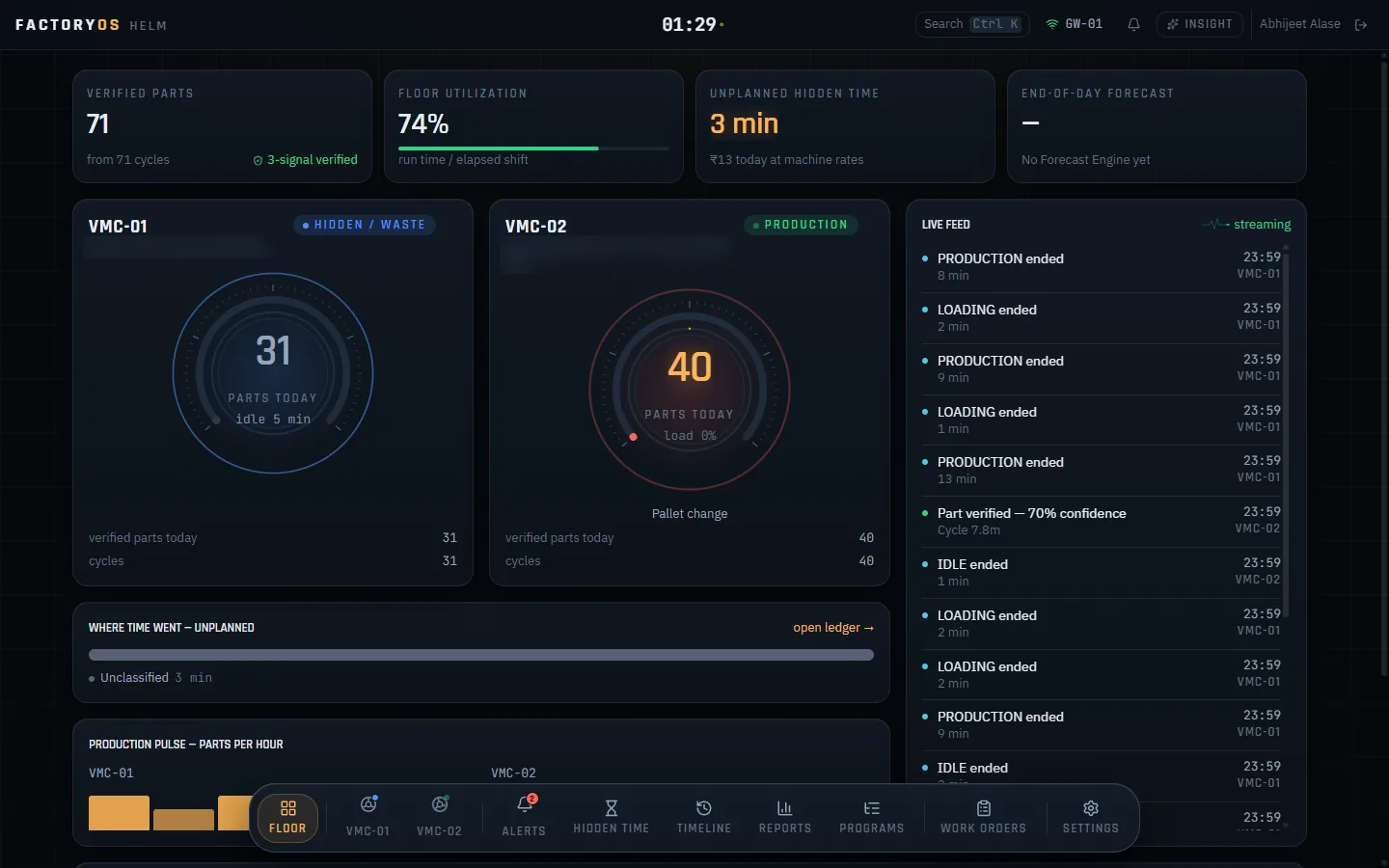
Grouped the way an owner looks at the floor: what is running, where the hours went, and who needs to know.
The live floor
Every machine, as it runs.
- Real-time machine status
- Part and cycle counting, cross-checked against the Fanuc part counter
- Utilization and availability per machine
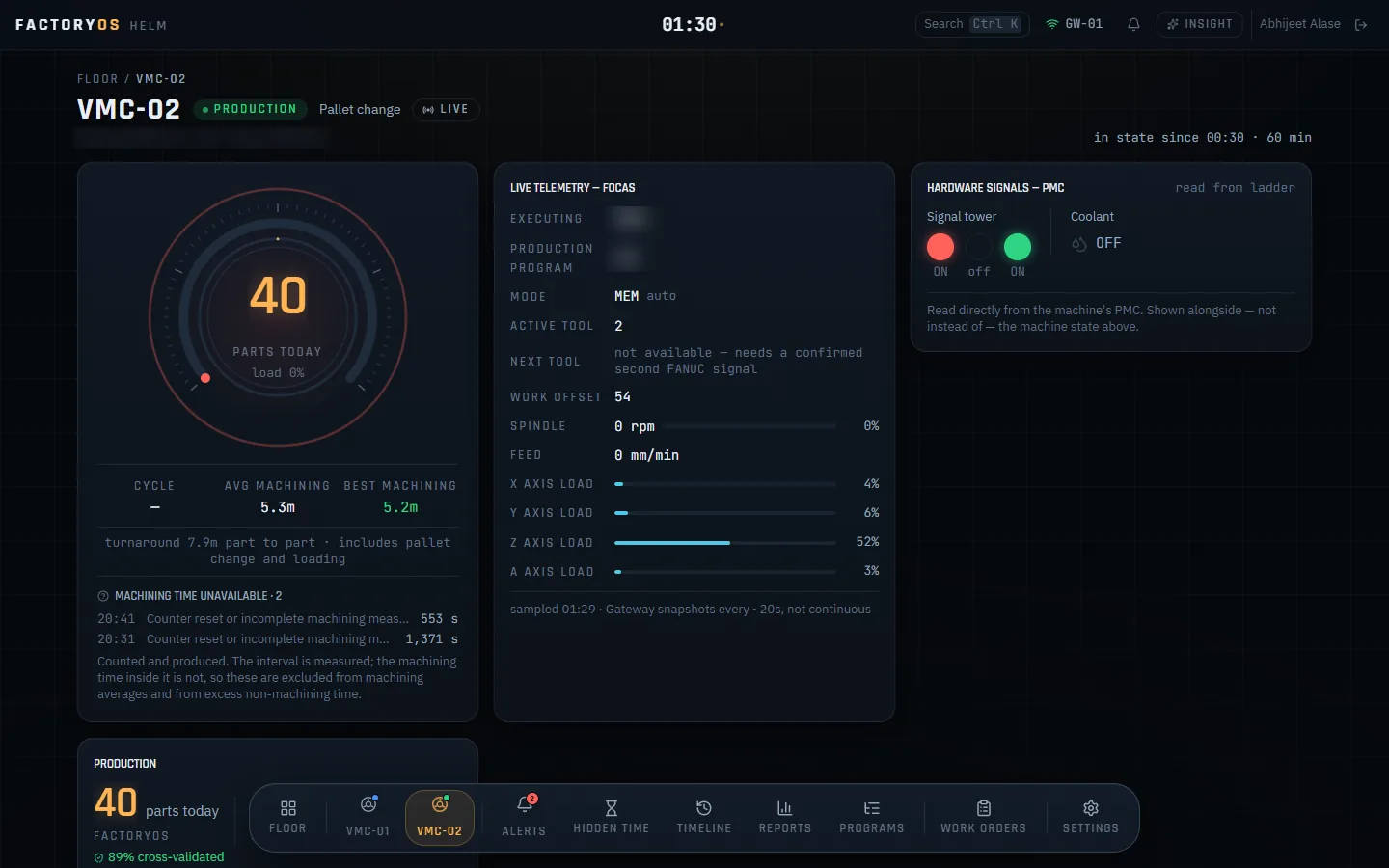
- Running program, spindle speed and load, feed and axis loads from the control
- Signal tower and coolant signals
- Machine health score with alarms, unexpected stops and feed holds
Where the hours go
The day of each machine, minute by minute.
- Machine-state timeline
- 24-hour replay of the timeline
- Hidden Time: hours the machine was not cutting
- Hidden Time priced at each machine’s own hourly rate
- Average and best machining time per part, and part-to-part turnaround
Reports
Per machine, for today, yesterday, the last 7 days or any date range.
- Machine summary
- Program performance
- Cycle history
- Part count reconciliation
- Anomalies
Jobs, programs and tools
The production records that sit beside the machine data.
- Work orders
- Program master
- Tool usage per tool: times used and cutting hours
- Average spindle load per tool
Alerts, access and data safety
The right people hear about it, and no data is lost when the network drops.
- Email alerts
- Six user roles
- Gateway buffers data while offline
- Catches up when the connection returns
What it looks like.
Screens from FactoryOS running on a real shop floor. Machine models and program numbers are blurred.
How FactoryOS works.
A gateway at the machine
A small edge gateway is fitted at each machine and connected to its Fanuc control over Ethernet.
It reads the control, read-only
The gateway reads the control using Fanuc FOCAS. It never writes to the CNC, so your programs and settings stay exactly as they are.
The web app shows the floor
Data streams to the FactoryOS web app: live status, the machine-state timeline, Hidden Time in rupees, work orders and tool history. If the connection drops, the gateway holds the data and catches up.
You act on it
The owner or supervisor opens it on a phone, sees which machine is standing and what that is costing, and gets an email alert when something needs attention.
Running in daily production.
FactoryOS is live in daily production on two VMCs, BFW machines with Fanuc controls, at a CNC job shop. Book a call and the founders will walk you through it.
FactoryOS watches the machines. Klevershop runs the paperwork.
Klevershop is our workshop management product: material inward and outward, job-work, sub-contracting, scrap, PDI reports, payroll and accounts with GST invoicing. Use FactoryOS for the machines, Klevershop for the paperwork, or both.
Questions shop owners ask about FactoryOS.
Which machines does FactoryOS work with?
Machines with Fanuc controls that have Ethernet. The gateway reads the control using Fanuc FOCAS. If your machines have other controls, talk to us before you plan anything.
Can FactoryOS change my programs or machine settings?
No. The gateway only reads from the Fanuc control. It never writes to the CNC.
Does FactoryOS show OEE?
It gives an OEE-style view, not an exact OEE number. Each machine shows run, idle and alarm time, utilization and availability, and the floor shows overall utilization. On top of that, Hidden Time prices the hours a machine was not cutting in rupees, at that machine’s own hourly rate.
Do I need to install an app on my phone?
No. FactoryOS is a web app. It works in the browser on your phone as well as on a computer.
What happens if the internet goes down on the shop floor?
The gateway buffers the data while it is offline and catches up when the connection returns.
How does FactoryOS tell us when something needs attention?
It sends email alerts. Who sees what is set with six user roles.